Writers Corner
Rejection Isn’t the End of the Story
There’s a moment every writer reaches, usually sooner than expected, when the replies start to come in.
They are often brief, polite, and final.
“Thank you for submitting… I’m sorry to say…”
Thredyl Blog

Rhonda Newton — North Idaho Children’s Book Author
Rhonda Newton is the author, illustrator, and publisher of fourteen children’s books, including
Masher the Potato, Paisley the Potato, Sprout the Potato, and The Fuzzytot Gang.
Her adorable rhyming storybooks have been a local favorite, especially the potato-themed titles!
Since late 2023, Rhonda’s books have delighted Idaho locals, out-of-state visitors, and the press. She even hand-made potato mascot costumes that now appear in parades and events. Recently, she created photo stands for readings, school visits, and craft fairs, huge hits with kids and grown-ups alike.
Beyond books, Rhonda designs character t-shirts, bookbags, die-cut stickers, and plush items, and is developing
a line of Idaho-themed products. She’s an active community volunteer and serves on local boards and committees in North Idaho.
- Author–illustrator of 14+ children’s books (potato series + more)
- Community events: parades, school visits, photo stands
- Merchandise: shirts, bags, stickers, plush concepts
- Active North Idaho volunteer and board member
Writing Tips
Publishing a book can feel overwhelming, especially when you hit the “submit” button. What if you missed a typo? What if your back-cover copy doesn’t sound quite right?
Here’s some good news: IngramSpark offers free revisions for 60 days after your book’s initial production date. That means you can update your interior or cover file without paying a fee during those first two months. After the 60-day window, a $25 fee applies for each new file upload.
Thredyl Blog
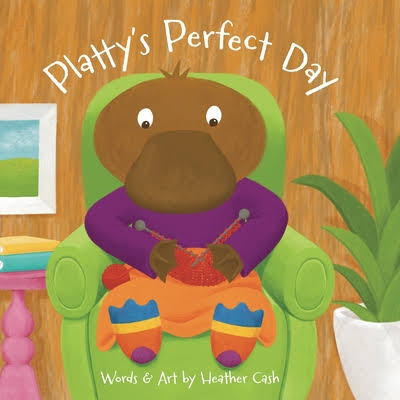
Heather Cash — Author, Illustrator, Educator
Heather Cash creates children’s stories and artwork with a warm, practical voice that helps new creators feel confident.
As an author–illustrator and teacher, she explains complex steps—cover design, interior layout, and file prep in simple, encouraging ways.
Her tutorials and resources support first-time authors and illustrators who want polished, professional books.
Heather’s focus on clarity, creativity, and approachable workflows has guided many beginners from idea to finished book.
- Author–illustrator with a focus on children’s books and creative education
- Clear, beginner-friendly explanations for covers and interior design
- Practical file-prep tips for KDP and IngramSpark workflows
- Encouraging teaching style that helps new creators build momentum
Explore more of Heather’s tips and step-by-step guidance on her official platforms:
Video Walkthroughs
Heather Cash Tutorials
Heather Cash is known for creating clear and encouraging tutorials for children’s book authors and illustrators.
This page gathers some of her most helpful resources for covers, interiors, and launch materials, with all links pointing directly to her official platforms.
Tip: If the player does not load, use the button above to open the video on YouTube.
Video Walkthroughs
How to Publish on IngramSpark
(Video Walkthrough)
IngramSpark is a global print-on-demand and distribution platform trusted by independent authors and publishers.
With IngramSpark, your book can reach bookstores, libraries, and retailers worldwide — without the cost of large print runs.
Start here to learn the essentials and see the publishing flow at a glance.
Thredyl Blog
Designing a Print Book Cover in Canva
(Amazon KDP & IngramSpark)
A strong book cover is one of the most important parts of your book. It’s the first
thing a reader sees — and for print books, it must also meet very specific technical
requirements. While Canva is an accessible and powerful design tool, it’s essential
to use it correctly when designing covers for print.
Unlike ebook or front-only designs, print book covers must be created as a
full wrap, including the front cover, spine, and back cover. These dimensions
depend on trim size, page count, and paper type, which is why starting with the
correct template is so important.
Canva + Print Covers: The Right Approach
Canva’s standard book cover templates are often designed for front covers only.
They can be useful for concepts or mockups, but they are not suitable for print
books unless you are working from an official platform-generated template.
The tutorials below, created by Heather Cash, show exactly how to design
print-ready book covers in Canva using the correct templates for both
Amazon KDP and IngramSpark. These videos are clear, practical, and extremely
helpful for authors who want professional results.
Amazon KDP Book Cover in Canva
This walkthrough demonstrates how to use Amazon KDP’s official cover template
inside Canva, ensuring your front cover, spine, and back cover are sized correctly.
IngramSpark Book Cover in Canva
In this video, Heather walks through designing a print-ready cover for IngramSpark,
using their template requirements while working comfortably inside Canva.
These tutorials are part of a broader body of work by Heather Cash, whose clear and practical guidance has helped many authors navigate the technical side of publishing. If you find these videos helpful, you may wish to explore more of her tutorials on her
YouTube channel.
Final Thought
Canva can absolutely be part of a professional publishing workflow, as long as it’s
used with the correct templates and an understanding of print requirements.
With the right guidance, it becomes a powerful, accessible tool for authors.
Video Walkthroughs
KDP Upload Walkthrough
In this tutorial, you’ll learn the steps to publish your book with
Amazon KDP. The process includes setting up your account,
entering book details, uploading your files, and previewing before publishing.
Publishing & Marketing
Publishing on Amazon KDP
KDP (Kindle Direct Publishing) lets indie authors publish eBooks and print books directly on Amazon, reaching readers worldwide while keeping creative and pricing control. It’s widely used by children’s authors alongside other platforms for broader distribution.
Publishing & Marketing
Designing with Canva
Getting your story written is only part of the journey — how your book looks
is just as important. A polished cover and clear interior layout help readers connect
with your story. When I created my own book, I turned to Canva,
because it made design simple, affordable, and surprisingly powerful.